PostPro Analytics (PPA)
LOG.COLLECT.ANALYZE.
Project-Tracking and Management for Content Creators, PostPro Studios and Agencies
Track projects, users, timelines and production activity in real time. Identify bottlenecks, improve scheduling, optimize team utilization and create transparent customer billing based on real production data from DaVinci Resolve Studio, Adobe Premiere Pro and Adobe After Effects and all major content-creation apps such as Photoshop, InDesign, Illustrator, Capture One, Blender and Cinema 4D. More integrations are in development.
Purchase securely through your DBSONIC account. Your license will be available immediately after payment.
DEEP INTEGRATION WITH YOUR APPS.
PPA integrates directly with DaVinci Resolve, Adobe Premiere Pro, Adobe After Effects, Photoshop, InDesign, Illustrator, Capture One, Blender and Cinema 4D. Project names and workflow metadata are captured through seamless automated background logging and translated into streamlined, searchable PPA intelligence for reporting and workflow analysis.
Integrated Apps
DaVinci Resolve
Premiere Pro
After Effects
Additional Integrated Apps
Photoshop
InDesign
Illustrator
Capture One
Cinema 4D
Blender
Additional integrations are in development.
Product preview
A New Level of Post-Production Intelligence
Single-User and Studio Version
Built for Studios & Agencies
PostPro Analytics is available in two editions for different post-production setups.
Single User is designed for solo editors, freelancers and individual creatives. It runs locally on your Mac or Windows computer and helps you track and analyze your own work with clarity and confidence.
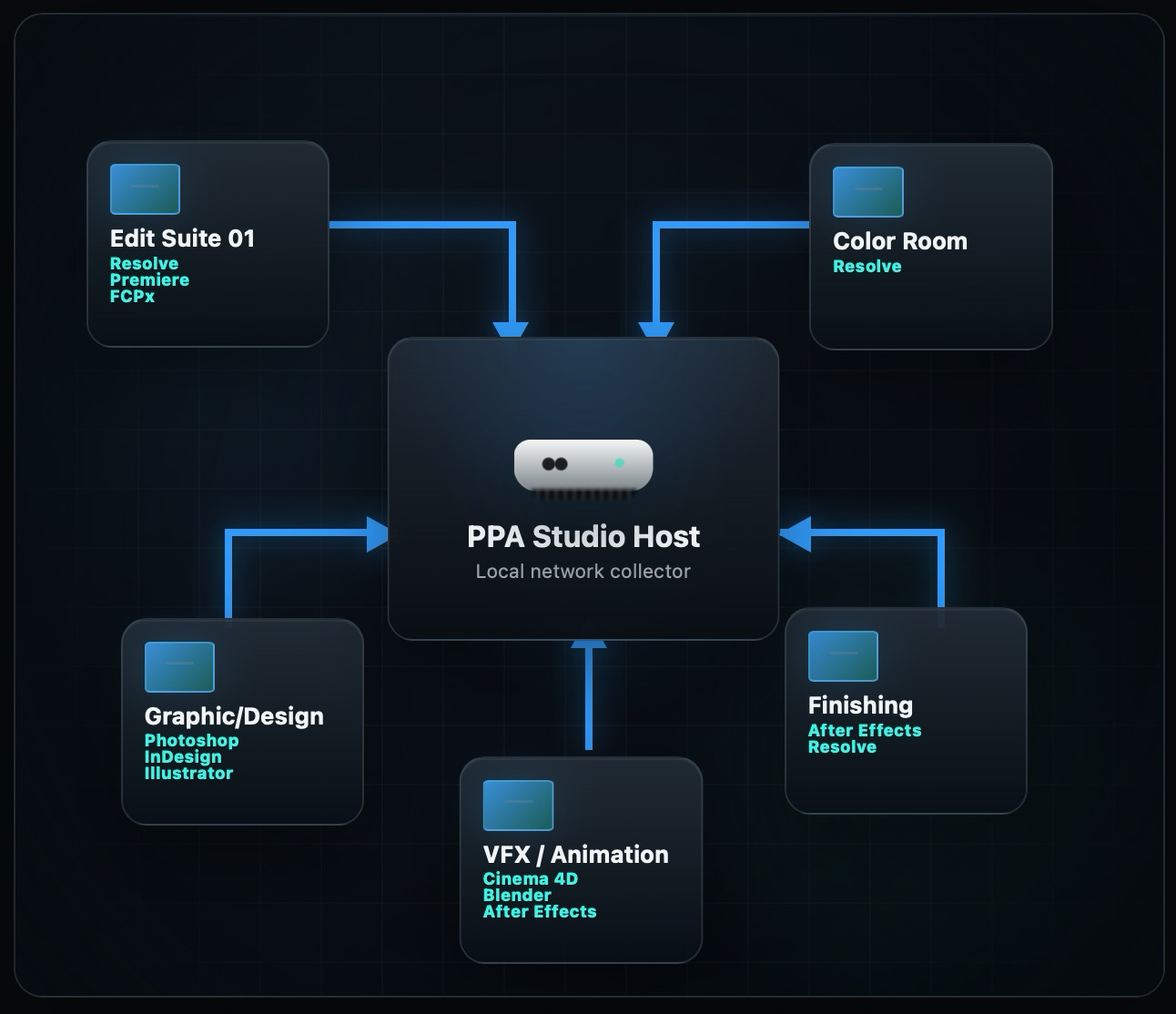
Studio is designed for facilities and agencies with multiple users working simultaneously on a local network. Each workstation runs a lightweight background logger that captures workflow metadata and sends it to a local PPA Studio Host.
The Studio Host collects data from up to 20 workstations in one searchable database, ready for reports, invoicing preparation and a clear visual overview of your team workflow.
Studio hosting is available on Mac. Windows can join an existing Studio Host; Windows hosting will follow in a later release.
Edit Suite 01
Resolve
Premiere
FCPx
Premiere
FCPx
Color Room
Resolve
Graphic/Design
Photoshop
InDesign
Illustrator
InDesign
Illustrator
Finishing
After Effects
Resolve
Resolve
VFX / Animation
Cinema 4D
Blender
After Effects
Blender
After Effects
PPA Studio Host
Local network collector
DaVinci Resolve, Adobe Premiere Pro, Adobe After Effects, Photoshop, InDesign, Illustrator, Capture One, Blender and Cinema 4D are integrated today.
See PPA in detail
YOUR ENTIRE POST-PRODUCTION WORKFLOW — FINALLY VISIBLE.
Your Workload Command Center.
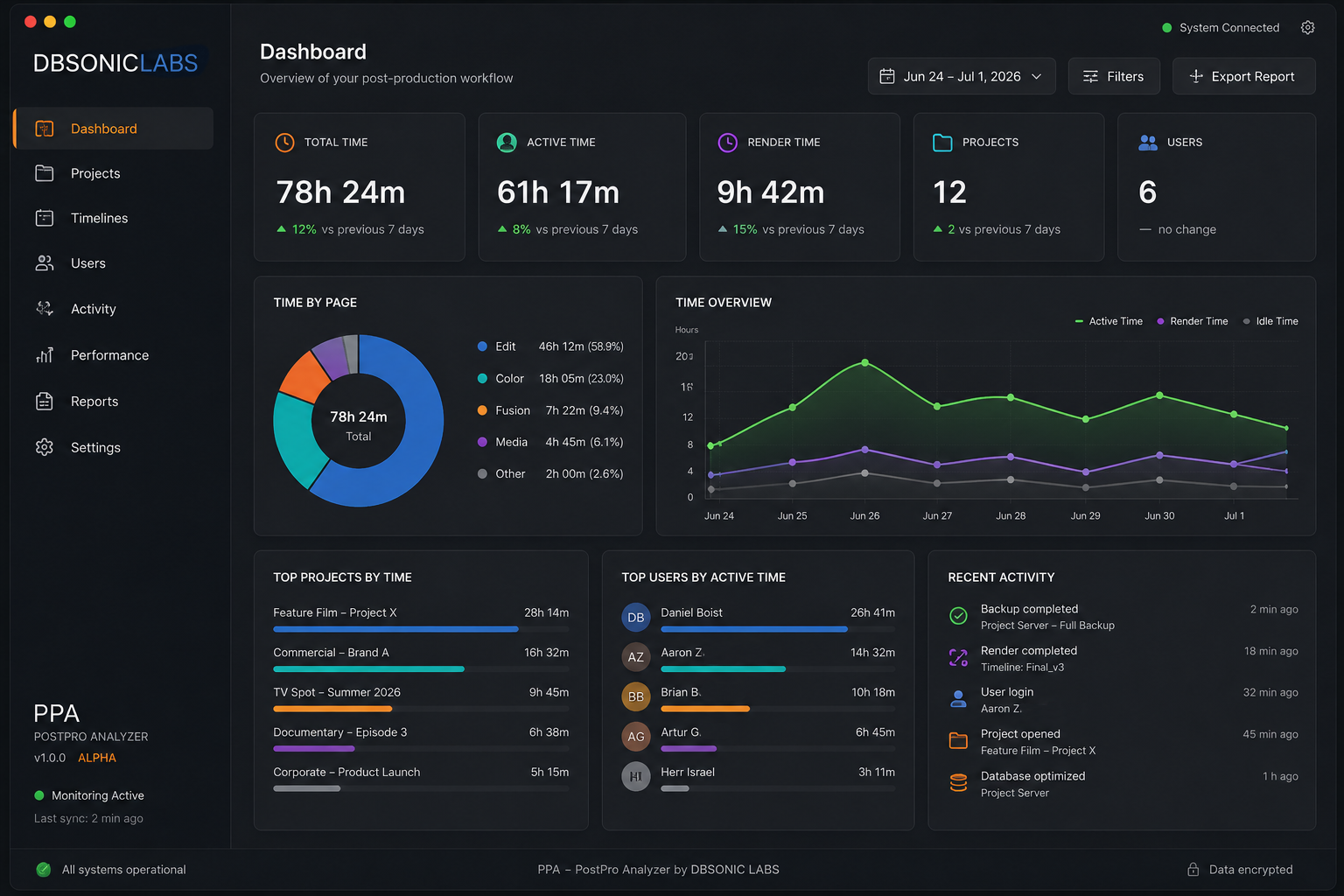
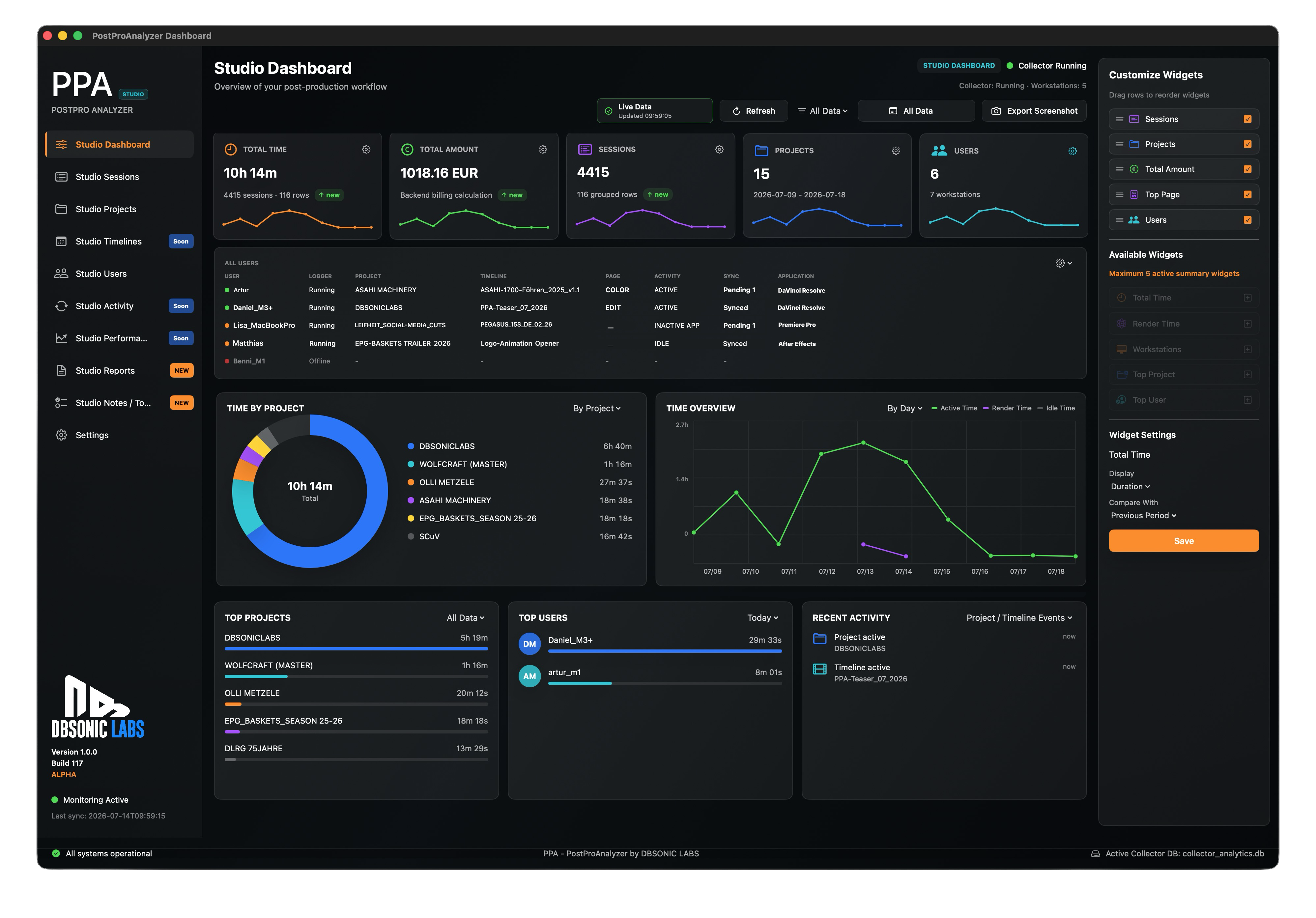
Interactive dashboard preview — scroll or move your cursor over the panels to explore.
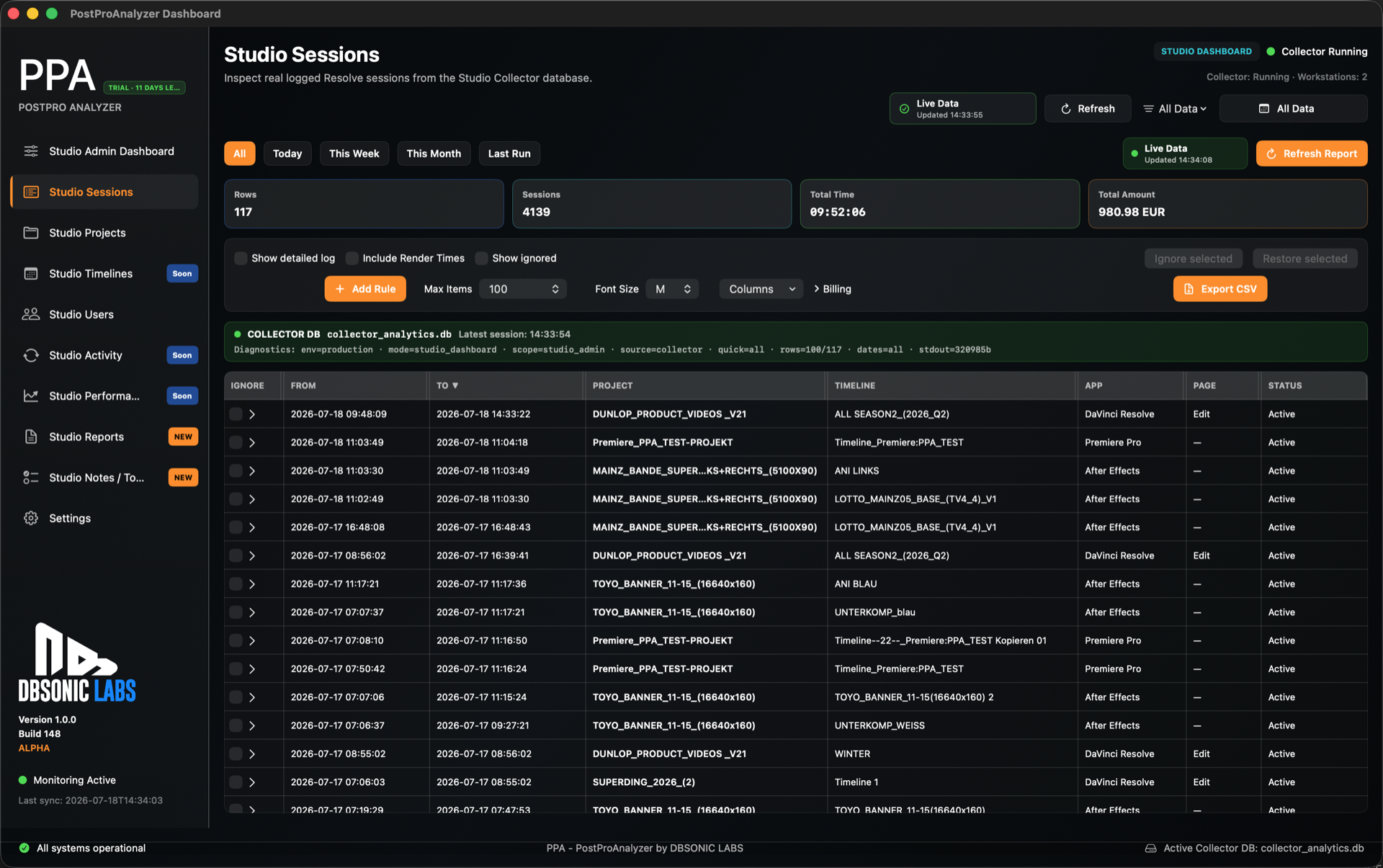
Studio Sessions
One searchable source of truth for every tracked session.
Inspect synced work from multiple users, apps and workstations in one clean table. Filter by project, timeline, app, user, tags or date range, then export exactly the visible rows for review, client communication or billing preparation.
- Resolve, Premiere Pro and After Effects rows in one view.
- Rule-based filters for fast production analysis.
- CSV and PDF export based on the current filtered and sorted result set.
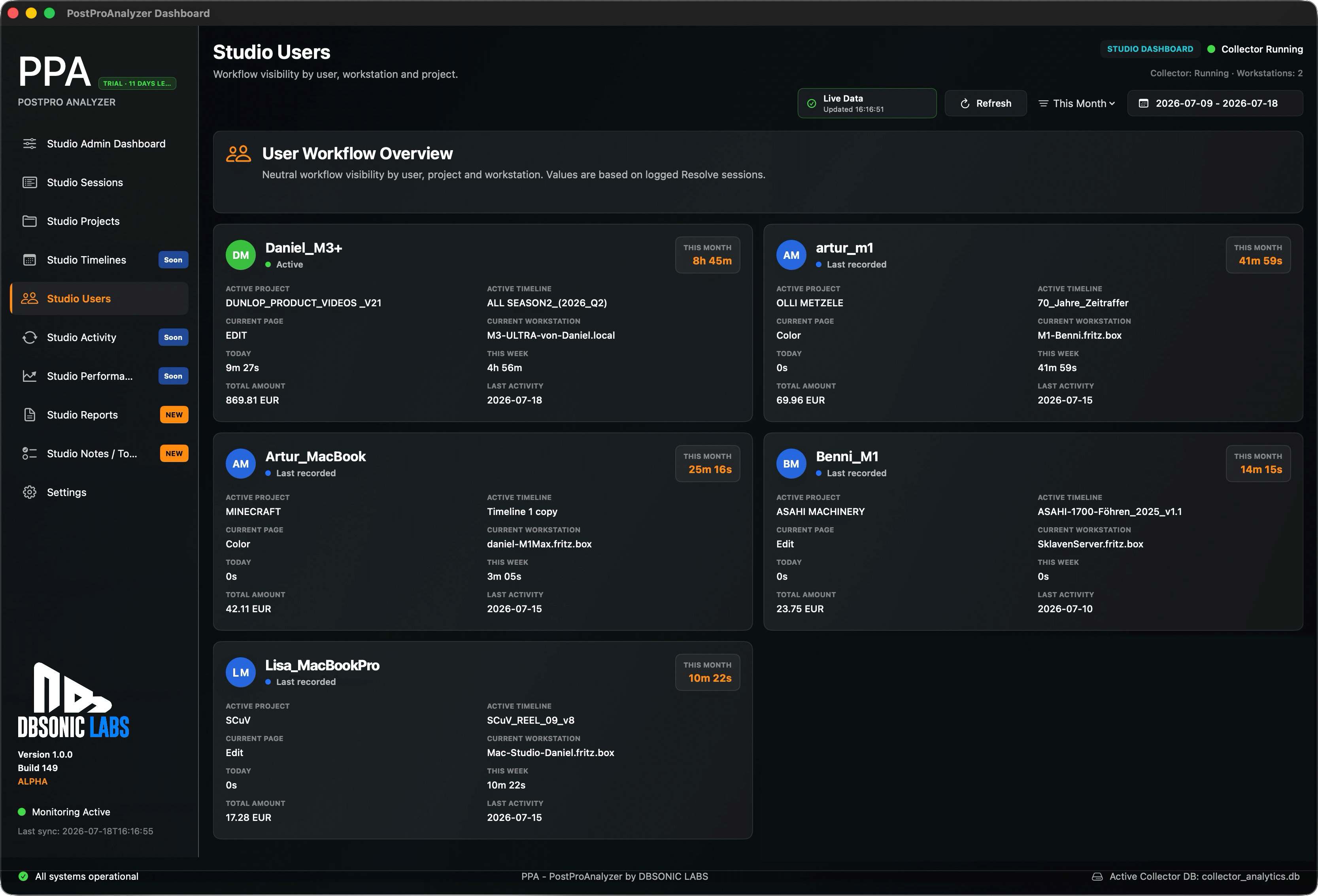
Studio Users
See who is active, where time is going and how your team is loaded.
Bring team activity out of scattered machines and into one operational picture. PPA helps producers and facility leads understand active users, workstation status and current production context without interrupting the creative team.
- Live user and workstation context for studio teams.
- Activity signals across supported creative applications.
- Clear utilization data for scheduling and resource planning.
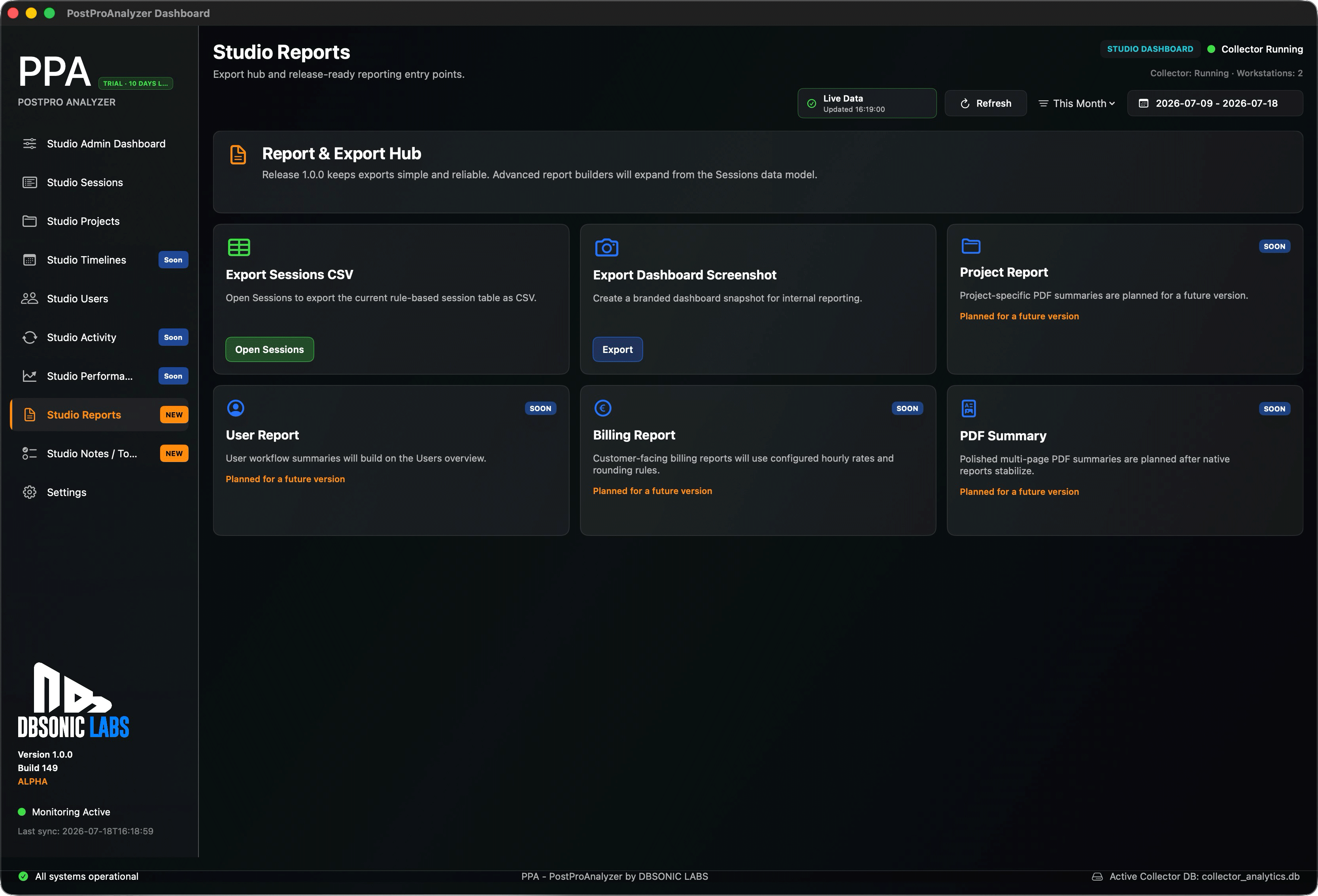
Studio Reports
Turn real production activity into reliable reporting.
Move from estimates to evidence. PPA turns tracked sessions into transparent project, timeline, user and app-based reporting that helps teams prepare invoices, review profitability and communicate effort with confidence.
- Reports based on actual tracked production sessions.
- Filterable data for customer, project and team reviews.
- Designed for confident exports and professional follow-up.
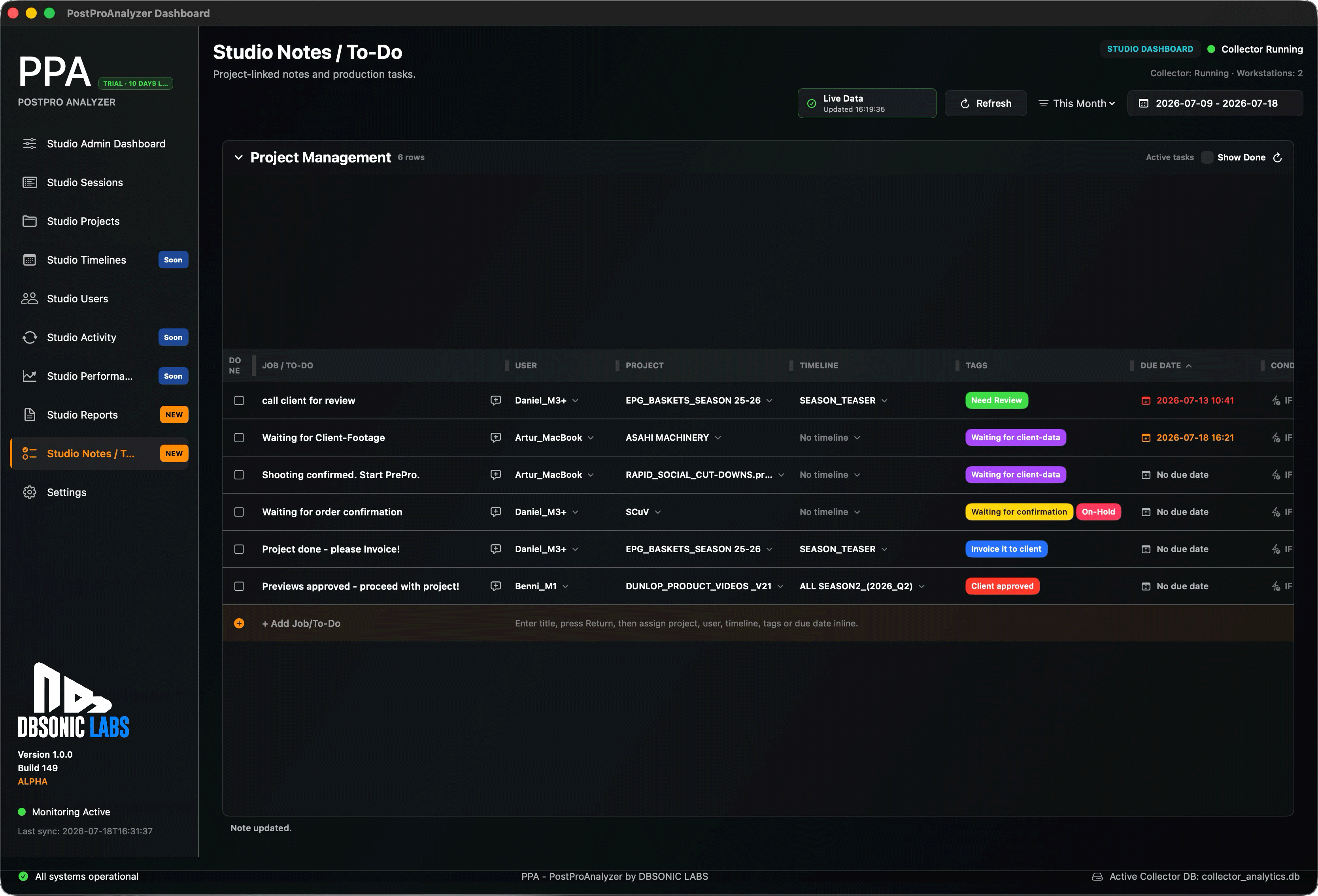
Studio Notes / ToDo
Project notes connected to the work that actually happened.
Keep production context close to your analytics. Studio Notes / ToDo brings project-linked notes, priorities, task status, due dates, comments and descriptions together in one place, so reporting and project management speak the same language.
- Notes and tasks connected to projects, timelines and users.
- Tags, status and priority for structured follow-up.
- Built around real production data instead of disconnected lists.
Pre-release walkthrough
Get a Deep Insight into What PPA Can Do for You
Privacy and Data Protection
NO WORRIES.
WE RESPECT YOUR PRIVACY.
PostPro Analytics (PPA) is not an employee surveillance or monitoring solution.
PPA has been developed exclusively to analyze project-related workflows, production times and resource utilization within professional post-production environments.
However, we have added a Privacy Mode to the Network Client that anonymizes user names and computer identities before activity data is stored or synchronized. This ensures that only project-based metadata is logged and stored in the PPA database.

Purpose & Privacy Statement
PostPro Analytics (PPA) has been developed exclusively to analyze project-related workflows, production times, and resource utilization within professional post-production environments.
PPA is not an employee surveillance or monitoring solution.
The software collects only project- and workflow-related metadata that are required for analytics and reporting purposes. Depending on the configuration, this may include information such as project names, timeline names, application state, active workspace, session durations, workstation identifiers, and user identifiers.
PPA does not:
- record or store the contents of projects, timelines, media files, or documents;
- capture screenshots or screen recordings;
- log keyboard input, mouse movements, or user interactions;
- intercept communications or personal messages;
- monitor activities outside the supported applications or the configured analytics scope.
The purpose of PPA is solely to provide organizations with meaningful insights into workflow efficiency, project effort, resource allocation, utilization, and production processes in order to improve planning, transparency, and operational efficiency.
The customer or system operator is solely responsible for ensuring that the deployment and use of PPA comply with all applicable laws and regulations, including but not limited to employment, privacy, and data protection laws, as well as any applicable works council agreements or internal company policies.
DBSONIC Labs neither designs nor markets PPA as a tool for employee surveillance or performance monitoring. Any use of the software outside its intended purpose, including use for unlawful or unauthorized monitoring of individuals, is solely the responsibility of the customer or operator. To the fullest extent permitted by applicable law, DBSONIC Labs shall not be liable for damages, claims, or legal consequences arising from such misuse or from the customer's failure to comply with applicable legal obligations.
Why PPA is important for me
Choose your role.
See your benefits.
I am a ...
See which projects are profitable.
Create billing reports for invoicing.
Manage projects, reports and invoicing.
Track edit, color, render and idle time.
Understand which customers require more work.
Export CSV and PDF reports from your filtered sessions.
Work locally on your Mac or Windows computer.
See how efficiently your team works.
Collect data from up to 20 workstations.
Find bottlenecks, idle time and rendering peaks.
Monitor multiple users and workstations in one view.
Understand which timelines consume the most resources.
Filter by project, user, date, page, tags and activity.
Build transparent customer billing reports.
Improve planning and team utilization across clients.
Trial and license options
Start with the full 14-day trial. Choose your license when you are ready.
Partner- oder Aktionslink ungültig. Bitte Code prüfen.
Trial
Download Free Trial
14-Day Trial
0 €Free full-feature trial including the Studio Version, made for real evaluation before you buy.
- Fully functional 14-day trial
- Includes Studio Version testing
- Required runtimes included; no separate Python installation
- Logged trial data is not lost after the trial ends
- Continue using your data after upgrading to a paid version
- DaVinci Resolve, Premiere Pro, After Effects, Photoshop, InDesign, Illustrator, Capture One, Blender and Cinema 4D can be used at the same time
Single User
Buy License
Single User Version
99EUR netPlus applicable VAT.
No subscription. One-time purchase.
For solo editors, freelancers and individual creators working on one local workstation.
- Local workflow tracking on your Mac or Windows computer
- Track project, timeline and application activity
- Analyze production time and project profitability
- Create reports for invoicing and customer transparency
- Your existing trial data stays saved when you activate a license
- DaVinci Resolve, Premiere Pro, After Effects, Photoshop, InDesign, Illustrator, Capture One, Blender and Cinema 4D can be used at the same time
Studio
Buy License
Manage additional Studio seats
Studio Version
299EUR netPlus applicable VAT.
No subscription. One-time purchase.
For post-production facilities, studios and agencies with multiple users working simultaneously on a local network.
- Includes 5 seats
- 1 x Host / 4 x Client
- Additional Studio seats are available for 49 € / USD each, up to 20 workstations
- Collect workflow data from multiple workstations
- DaVinci Resolve, Premiere Pro, After Effects, Photoshop, InDesign, Illustrator, Capture One, Blender and Cinema 4D can be used at the same time
The trial can be installed and tested before purchase. After payment, your existing trial is unlocked online. No reinstall is required.
Already purchased? Manage your licensesNeed help? hello@dbsoniclabs.de
How it works
From trial to licensed in three simple steps.
Buy securely
Choose your license in your DBSONIC account and complete payment securely with Stripe.
Get your license
Your license appears automatically in your DBSONIC account immediately after payment.
Activate your computer
Create a one-time activation code in your account and activate PostPro Analytics.
Roadmap
Current Status
Public Beta · 1964-W96
- PostPro Analytics W96 is available as a 14-day public beta trial for Mac and Windows.
- Add your own report logo, including transparent PNGs. Preview PDFs before export, choose a bright or dark background and text size, and adjust columns with warnings when content needs to wrap.
- Create a technical diagnosis log for Support without including project data or personal information.
- Improved Settings alignment, Studio Timelines scrolling and sidebar layout. The Mac companion no longer creates a duplicate PPA menu item, and the menu shows whether the Logger is running.
- Directly integrated with DaVinci Resolve, Adobe Premiere Pro, Adobe After Effects, Photoshop, InDesign, Illustrator, Capture One, Blender and Cinema 4D.
- Choose the Single User or Studio edition that fits your workflow after the trial.
- Further integrations are in development for upcoming releases.
Current products
A compact portfolio for editors, colorists, assistants and technical supervisors.
PostPro Analytics
Operational intelligence for DaVinci Resolve teams: understand where time goes, optimize profitability and bill with confidence.
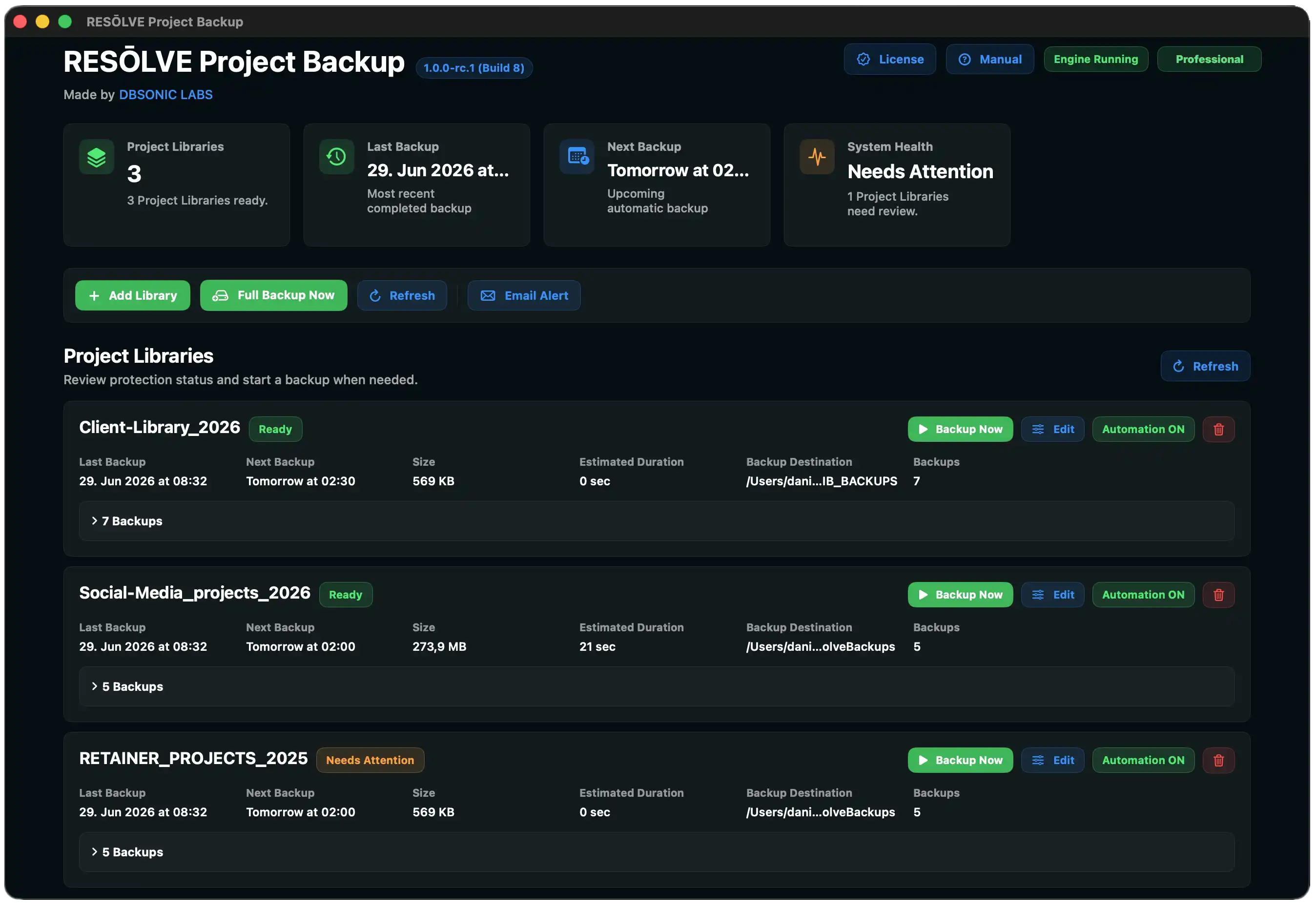
RESŌLVE Project Backup
Project backup workflows for DaVinci Resolve environments, designed for predictable handoffs and recovery confidence.
XS-PRO
AI-assisted video accessibility with transcription, visual description and natural voiceovers.
DescribeAccessible video context
NarrateSelectable AI voices
PostPro Analytics V1.0
Start your fully functional 14-day trial.
AI-ready answers
Questions creators and studios ask before tracking production work.
We have prepared public answers for common questions around tracking work across DaVinci Resolve Studio, Adobe Premiere Pro, Adobe After Effects, Photoshop, InDesign, Illustrator, Capture One, Blender and Cinema 4D, studio workload, billing reports and privacy.
All product names, trademarks and registered trademarks are property of their respective owners. DBSONIC LABS is independent and is not affiliated with, endorsed by, or sponsored by Adobe, Apple, Blackmagic Design, Maxon, Blender Foundation, or other third-party companies, products and trademarks.